
Why Architecture Determines SharePoint Performance
SharePoint excels at document management, permissions, governance, and compliance. It was never designed to act as a high-frequency transactional system for large-scale querying, real-time filtering, or high-traffic asset delivery.
In large enterprises — especially law firms, financial institutions, and M&A teams — performance issues emerge when SharePoint is forced to handle workloads better suited for scalable application and data platforms.
High-Level Enterprise SharePoint Architecture
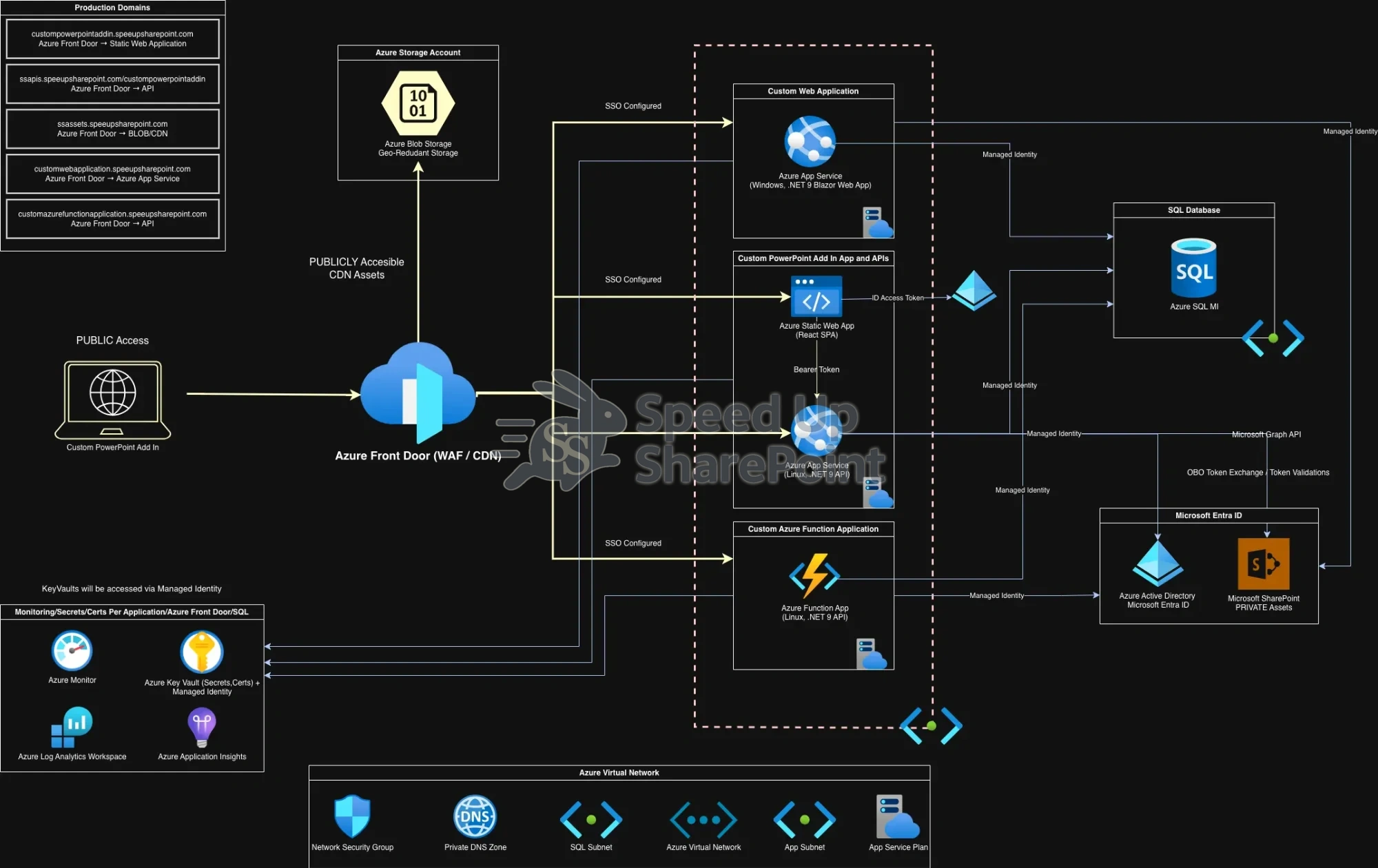
Click to view full-size diagram.
Public Access & Edge Layer
All user traffic enters through Azure Front Door, which acts as the single global entry point. This layer provides Web Application Firewall (WAF) protection, DDoS mitigation, SSL termination, and intelligent routing.
- Global CDN caching for static assets
- Host- and path-based routing to backend services
- Edge-level security enforcement before traffic reaches applications
Production Domains & Workload Separation
Each production hostname maps to a dedicated backend workload. This separation allows independent scaling, deployment, and optimization.
- Static Web Apps: React SPA for fast global UI delivery
- Azure App Services: Blazor web application and .NET 9 APIs
- Azure Function Apps: Serverless, event-driven API workloads
- Azure Blob Storage: High-traffic public CDN assets
Application Layer Design
The application layer is optimized for performance and security. Lightweight frontends authenticate users and call backend APIs using bearer tokens. Business logic is isolated from UI concerns.
Serverless functions handle background processing and performance-critical workloads, allowing horizontal scaling without infrastructure overhead.
Authentication & Zero-Trust Security
Enterprise single sign-on (SSO) is enforced across all applications. Azure Managed Identity eliminates stored secrets and embedded credentials.
- No secrets in source code
- Azure Key Vault for certificates and sensitive configuration
- Strict identity-based access controls
Data & Networking Isolation
Backend services operate within a protected Azure Virtual Network (VNet). Azure SQL Managed Instance runs in a private subnet and is not publicly accessible.
This design ensures enterprise-grade data isolation, regulatory compliance, and reduced attack surface.
Storage Offloading Strategy
Non-sensitive, high-traffic assets are offloaded from SharePoint and stored in Azure Blob Storage. These assets are delivered globally through Azure Front Door CDN.
This dramatically reduces SharePoint load, API calls, and page load times — a critical optimization for large enterprises.
Monitoring & Observability
Every layer feeds into Azure Monitor, Application Insights, and Log Analytics. This provides end-to-end visibility into performance, security, and system health.
- Request tracing across services
- Bottleneck and latency detection
- Centralized audit and security logging
Why This Architecture Works
- Performance-first design
- Zero-trust security model
- Enterprise SSO and compliance readiness
- Independent scaling of components
- Optimized SharePoint offloading strategy
- Designed for law firms, banks, and M&A teams